ShipBob vs ShipHero: Which Shipping Software is Better for Shopify? (2026)
Links on this page are commercial in intent, at no extra cost to you — they never affect which products we recommend. Read the full disclosure.
Compare features
Showing all 2 products
| Product | Multi-warehouse | API access | Inventory sync |
|---|---|---|---|
| ShipBob | Yes | Yes | Yes |
| ShipHero | — | Yes | — |
Introduction: Why Your Shipping Software Choice Matters
For Shopify merchants, the post-purchase experience is just as critical as the storefront itself. Late shipments, inaccurate inventory, and clunky fulfillment workflows erode customer trust fast. That’s why picking the right shipping and fulfillment platform isn’t a minor operational detail — it’s a strategic decision.
Two names consistently rise to the top of the conversation: ShipBob and ShipHero. Both promise to streamline fulfillment for ecommerce brands, but they approach the problem from fundamentally different angles. ShipBob operates as a third-party logistics (3PL) provider with its own warehouse network, while ShipHero offers a warehouse management system (WMS) designed for brands that manage their own fulfillment operations.
In this comparison, we’ll break down exactly how each platform performs for Shopify store owners so you can make a confident, informed decision.
 ShipBob Overview
Founded in 2014 and headquartered in Chicago, ShipBob has grown into one of the most recognized names in ecommerce fulfillment. The company operates a global network of fulfillment centers across the United States, Canada, Europe, and Australia, giving Shopify merchants the ability to distribute inventory closer to their end customers for faster delivery times.
ShipBob’s value proposition is straightforward: you send your inventory to their warehouses, connect your Shopify store, and they handle picking, packing, and shipping every order. The platform provides a centralized dashboard for inventory management, order tracking, and analytics.
Key ShipBob Features
- Distributed Inventory: Split stock across multiple fulfillment centers to reduce shipping zones and transit times.
- Native Shopify Integration: One-click connection with real-time order syncing, inventory updates, and tracking number pushback.
- 2-Day Express Shipping: ShipBob offers a 2-day shipping program covering the contiguous U.S., helping Shopify brands compete with Amazon-level delivery expectations.
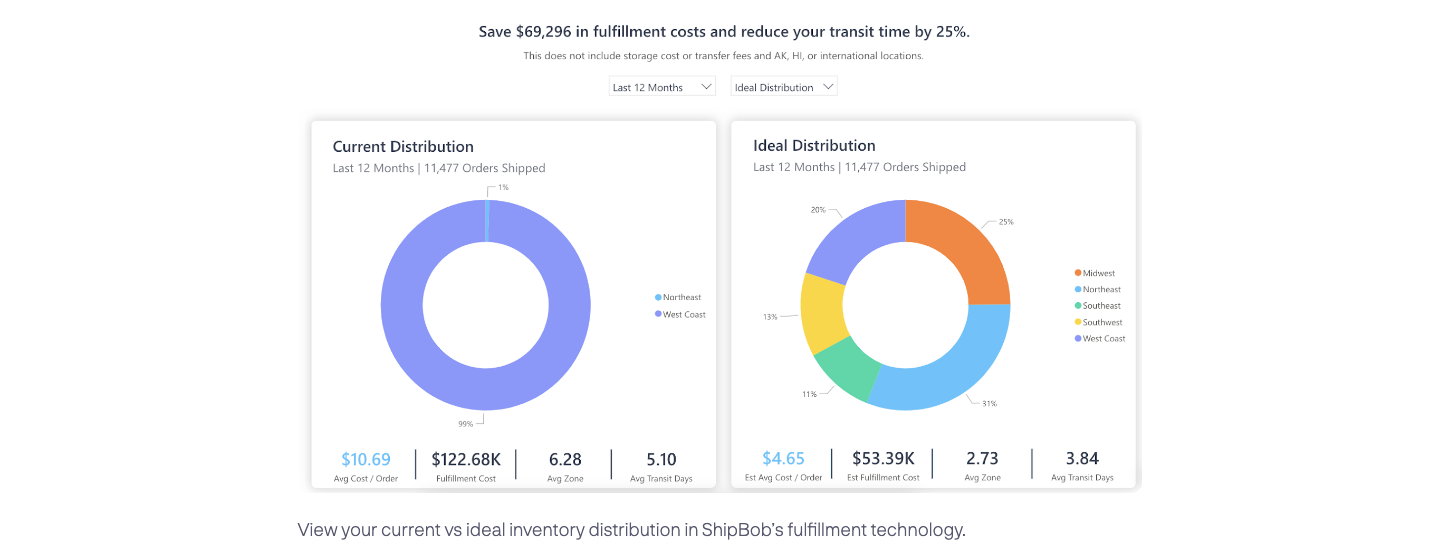
- Analytics Dashboard: Built-in reporting on fulfillment costs, transit times, inventory forecasting, and order accuracy.
- B2B and Wholesale Fulfillment: Support for EDI-compliant retail orders alongside direct-to-consumer (DTC) fulfillment.
- Returns Management: Automated return processing with configurable inspection and restocking workflows.
ShipBob Pros & Cons
Pros:
- Fully outsourced — no need to lease warehouse space or hire fulfillment staff
- Extensive fulfillment center network for fast domestic and international shipping
- Excellent native Shopify and Shopify Plus integration
- Transparent dashboard with real-time inventory and shipment visibility
- Scales well from small to mid-market brands
Cons:
- Less control over the physical fulfillment process compared to self-fulfillment
- Pricing can be complex — receiving, storage, pick-and-pack, and shipping fees add up
- Custom packaging and kitting options may carry additional fees
- Not ideal for brands that require highly customized unboxing experiences at scale
 ShipHero Overview
ShipHero, founded in 2013, takes a different approach. While the company does offer an outsourced fulfillment service, it’s best known for its cloud-based warehouse management system (WMS) built specifically for ecommerce brands and 3PLs that operate their own warehouses. If you’ve outgrown basic shipping label generation and need serious operational control over your fulfillment floor, ShipHero is purpose-built for that.
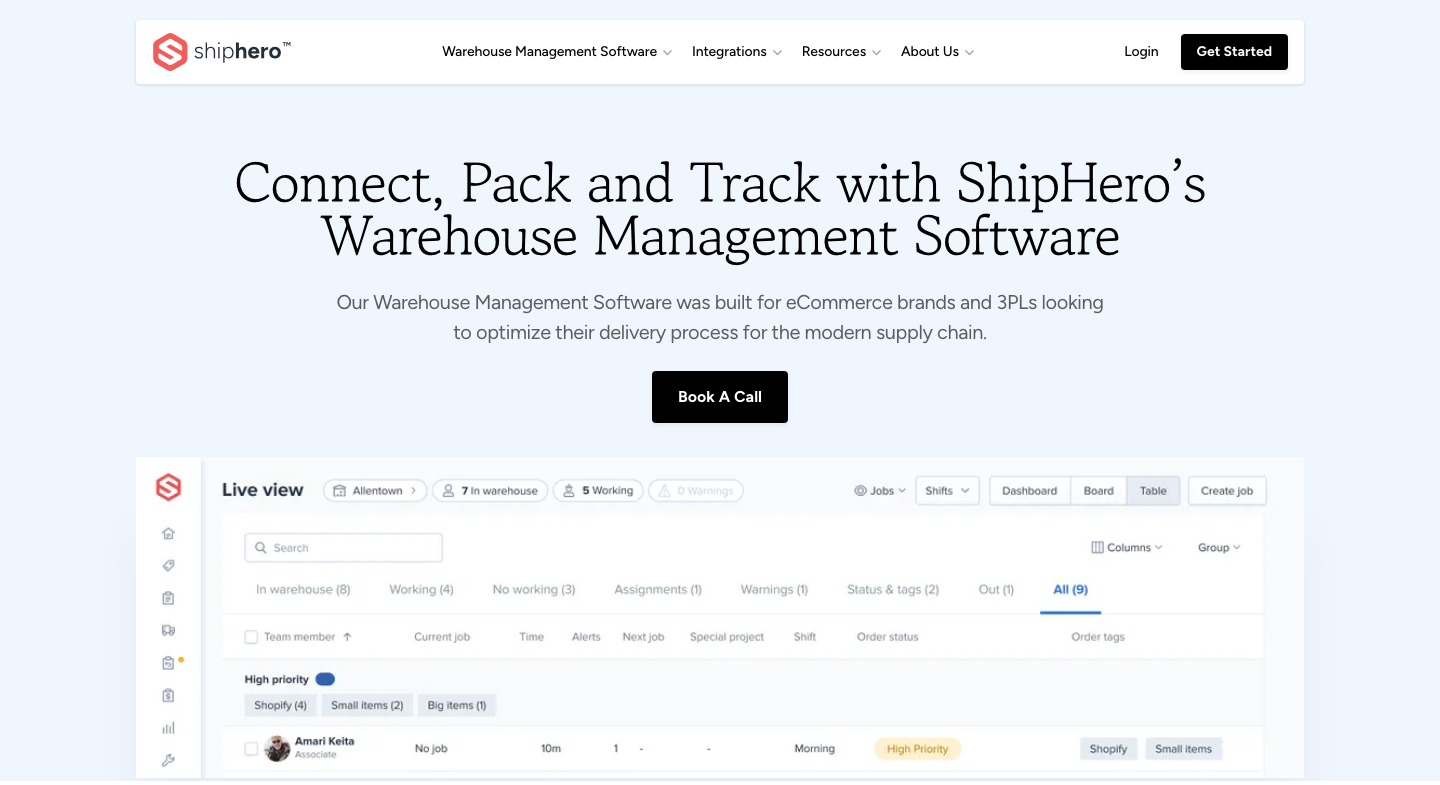
The platform provides mobile-driven picking workflows, barcode scanning, inventory management, batch shipping, and deep automation — all designed to make self-fulfillment faster and more accurate.
Key ShipHero Features
- Cloud-Based WMS: Full warehouse management with bin/location tracking, cycle counts, and real-time inventory accuracy.
- Mobile-First Picking: Workers use mobile devices with barcode scanning for pick, pack, and verify workflows, dramatically reducing error rates.
- Shopify Integration: Direct integration with Shopify and Shopify Plus, including multi-store and multi-warehouse support.
- Automation Rules: Configure rules to auto-select carriers, assign warehouses, prioritize orders, and trigger workflows based on order attributes.
- Rate Shopping: Built-in carrier rate comparison to automatically select the cheapest or fastest shipping option per order.
- Outsourced Fulfillment Option: For brands that prefer not to self-fulfill, ShipHero also operates its own fulfillment network.
ShipHero Pros & Cons
Pros:
- Exceptional warehouse management tools — ideal for brands running their own operations
- Mobile-driven workflows reduce picking errors and speed up fulfillment
- Flat-rate pricing model is transparent and easier to forecast
- Powerful automation engine for carrier selection, routing, and order prioritization
- Strong multi-warehouse and multi-client (3PL) capabilities
Cons:
- Requires you to have your own warehouse and team (unless using their outsourced service)
- Steeper learning curve — the WMS is powerful but takes time to configure properly
- The outsourced fulfillment network is smaller than ShipBob’s
- Higher monthly software cost may not make sense for very small Shopify stores
ShipBob vs ShipHero: Feature Comparison
| Feature | ShipBob | ShipHero |
|---|---|---|
| Primary Model | 3PL / Outsourced Fulfillment | WMS Software (+ optional 3PL) |
| Shopify Integration | Native, one-click | Native, multi-store support |
| Warehouse Network | 40+ global locations | Smaller network (outsourced tier) |
| 2-Day Shipping | Yes (U.S. coverage) | Depends on your carrier setup |
| Inventory Management | Dashboard-level visibility | Deep WMS with bin-level tracking |
| Barcode Scanning | Handled by ShipBob staff | Mobile scanning for your team |
| Carrier Rate Shopping | Managed by ShipBob | Built-in, fully configurable |
| Returns Processing | Yes | Yes |
| B2B / Wholesale | Yes, EDI-compliant | Yes |
| Best For | Brands wanting hands-off fulfillment | Brands running their own warehouse |
Pricing: ShipBob vs ShipHero
Pricing is where the philosophical difference between these two platforms becomes most apparent.
ShipBob Pricing
ShipBob uses a variable pricing model based on the services consumed. You’ll typically pay for:
- Receiving: A fee per man-hour for unloading and shelving inbound inventory.
- Storage: Monthly fees based on shelf, bin, or pallet space used.
- Pick & Pack: A per-order fulfillment fee (first pick included, additional picks charged per item).
- Shipping: Negotiated carrier rates passed through based on weight, dimensions, and destination.
ShipBob provides custom quotes — its pricing page states plainly that all quotes are customized for each customer — so the only route to a number is the lead form, which wants your company, website, industry, phone and monthly shipment volume first. ShipBob does not publish what sits inside that quote, so the total is the thing to negotiate, not the line items.
ShipHero Pricing
ShipHero’s WMS pricing is no more public than ShipBob’s, and arguably less so: /pricing, /plans and /wms-pricing all 404, the navigation carries no pricing link, and the only pricing-adjacent page is a “Request a Quote” form asking for your name, phone, email, company and a monthly order band (1–999, 1,000–9,999, 10,000–24,999 or 25,000+). Nothing is published about a subscription price, a per-order rate, or what either would include.
Key Takeaway: Neither vendor publishes a price, so this decision cannot be made on cost until both quotes are in front of you. What you can decide beforehand is what you are buying: ShipBob quotes a total fulfillment cost with the warehouse inside it; ShipHero quotes software for a warehouse you run yourself. Request both with the same order data, so the two numbers are at least answerable to each other.
Shopify Integration: How Do They Compare?
Both platforms integrate natively with Shopify and Shopify Plus, but the nature of the integration differs based on each product’s architecture.
ShipBob + Shopify
ShipBob’s Shopify integration is seamless and designed for merchants who want minimal technical involvement. Once connected, orders flow automatically from your Shopify store to ShipBob’s fulfillment dashboard. Inventory levels sync back to Shopify in real time, and tracking numbers are pushed to customers automatically. For Shopify Plus merchants, ShipBob supports advanced features like custom checkout scripts and multi-currency storefronts.
ShipHero + Shopify
ShipHero’s Shopify integration is equally robust but geared toward operational control. The platform supports connecting multiple Shopify stores to a single WMS instance, which is valuable for brands operating separate storefronts (e.g., a U.S. store and a Canadian store). Inventory syncs in real time, and ShipHero’s automation rules can route Shopify orders to specific warehouses or assign carriers based on order weight, destination, or SKU-level logic.
Scalability and Growth
How well does each platform support your Shopify store as it scales?
ShipBob scales by expanding your physical footprint across their warehouse network. As your order volume grows and your customer base becomes more geographically distributed, you can split inventory across additional fulfillment centers — without managing any of the logistics yourself. This makes ShipBob an attractive option for brands scaling from hundreds to tens of thousands of orders per month.
ShipHero scales differently. As your operation grows, you add warehouse staff, expand your physical space, and lean on ShipHero’s WMS to maintain efficiency and accuracy. The software supports multi-warehouse configurations and is used by operations processing hundreds of thousands of orders per month. For brands that want to control their margins and build fulfillment as a competitive advantage, this path offers more long-term flexibility.
Who Should Choose ShipBob?
- Shopify brands that want fully outsourced fulfillment without managing a warehouse
- Growing DTC brands shipping 100 to 10,000+ orders/month that need fast, reliable delivery
- Merchants who want distributed inventory across multiple U.S. and international locations
- Teams with limited operations staff who need a partner, not a software tool
- Brands competing on fast delivery speed (2-day shipping programs)
Who Should Choose ShipHero?
- Shopify brands that operate their own warehouse and need a professional WMS
- Businesses doing high volume that want granular control over fulfillment costs and processes
- 3PL operators who fulfill for multiple Shopify clients from the same facility
- Brands that need advanced automation — carrier rate shopping, order routing rules, and barcode-verified workflows
- Companies building fulfillment as a core competency rather than outsourcing it
ShipBob Alternatives to Consider
If neither ShipBob nor ShipHero feels like the right fit, here are a few other platforms worth evaluating for your Shopify store:
- ShipStation: A popular shipping label and order management platform — lighter than ShipHero but great for smaller operations handling their own packing.
- Deliverr (now Flexport): A fulfillment service similar to ShipBob with a focus on fast, affordable shipping and marketplace integration.
- Shopify Fulfillment Network: Shopify’s own logistics offering, tightly integrated with the platform for eligible merchants.
Final Verdict: ShipBob vs ShipHero for Shopify
| Criteria | Winner |
|---|---|
| Ease of Setup | ShipBob |
| Warehouse Control | ShipHero |
| Shopify Integration | Tie |
| Pricing Transparency | ShipHero |
| Delivery Speed | ShipBob |
| Scalability (Outsourced) | ShipBob |
| Scalability (Self-Fulfill) | ShipHero |
| Automation & Customization | ShipHero |
The right choice comes down to one fundamental question: do you want to outsource fulfillment, or own it?
If you’re a Shopify brand that wants to focus on product development, marketing, and growth while a logistics partner handles the warehouse floor, ShipBob is the stronger choice. Its fulfillment network, 2-day shipping program, and hands-off model let you deliver a premium post-purchase experience without building out operations infrastructure.
If you already run your own warehouse — or plan to — and you need best-in-class software to maximize accuracy, speed, and efficiency on the floor, ShipHero is the better investment. Its WMS is built for serious ecommerce operations and gives you the control that outsourced models simply can’t.
Key Takeaway: There’s no universally “better” platform here — only the right one for your operational model. Shopify merchants outsourcing fulfillment should start with ShipBob. Those building or running their own warehouse should evaluate ShipHero. Both are excellent at what they do.
Ready to optimize your Shopify fulfillment?
Try ShipBob Free Try ShipHero FreeA vendor won't publish its prices. What do you do?
- Skip it — no published price, no shortlist — your answer
- Book the demo anyway — your answer
- Depends how well it fits everything else — your answer
- Ask other merchants what they actually pay — your answer
One tap, no sign-in. We store the count for each option and nothing else — no cookie, no account, no identifier, and nothing you typed. Nothing is saved on your device, so reloading the page asks again.
See the live Shipping & 3PL leaderboard — every product we have verified in this category, ranked by what it costs at your volume, with every figure dated and sourced.